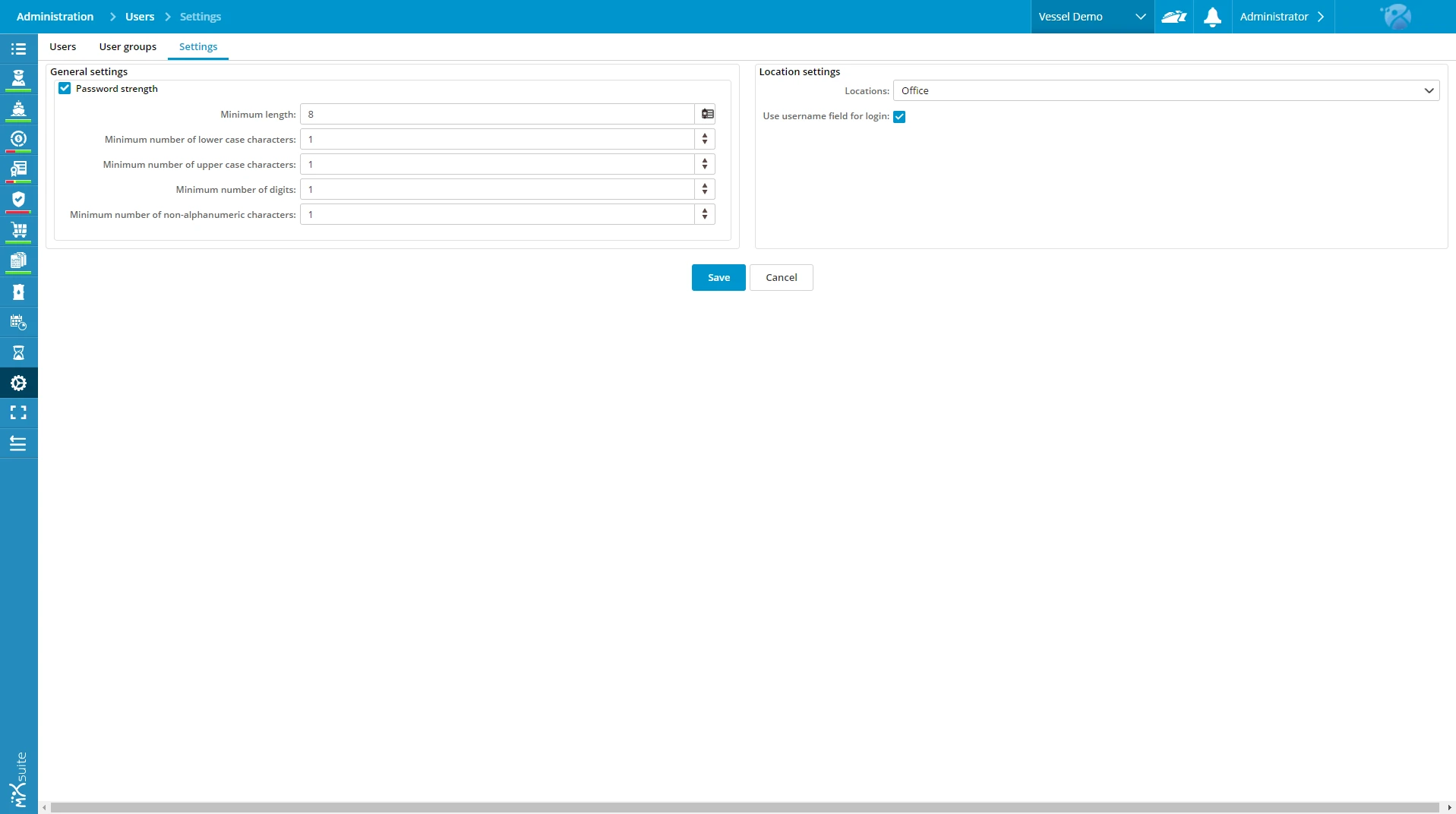
User security settings panel in maritime fleet management software.

Security and Password settings

Since the release of MXSuite version 3 it was more than obvious that something had to be done to make sure that your valuable MXSuite data would be well protected. It is possible to access MXSuite with any device from anywhere in the world. It is obvious you want your users to use complex password to prevent any unauthorized access.

If you want to adjust your settings, go to: Administration > Users > Settings.

Easy login

The left side of the screen shows the password settings. The right side gives you the option to have an empty username field, or a dropdown list with the usernames visible at login. The dropdown list is highly valued onboard. Especially if you have to login frequently. With this option activated you only have to select your name and type in your password.

Related blogs

How to reduce TCO onboard ships?

When managing a fleet, the initial investment in a vessel is only the tip of the iceberg. The real challenge lies beneath the surface: the Total...

$
The importance of a maritime CMMS

In the maritime industry, time is your most valuable asset. Whether it’s an unplanned engine repair in the middle of the sea or a failed audit due...

$